3D → 2D drawings
Ortho2D Drawings
Drop in a 3D model and get a real technical sheet — orthographic views, sections, automatic dimensions and a title block.
STLSTEPOBJGLBFBX→PDFDXFSVG
Ortho2D turns a 3D model into a 2D drawing — orthographic views, sections, automatic dimensions, standards line weights and a professional title block. Import STL, STEP, OBJ, GLB, FBX, IGES or 3DM; export PDF, DXF and SVG. Everything runs in your browser, with no CAD install.
Drop in a 3D model and get a real technical sheet — orthographic views, sections, automatic dimensions and a title block.
Draft shop drawings right in the browser with ready symbol libraries — or snap a photo of a hand sketch and get clean CAD lines.
Turn a photo into a textured 3D model with PBR materials and studio lighting — then give it real dimensions, optimise it and export it for Unreal, Unity, Blender or 3D printing.
Pick from 60+ real-size products — cartons, bottles, cans, jars, pouches and bags — drop in your artwork or Illustrator file, and get a folded 3D proof, a print-ready dieline and an automatic pre-press check.
A 3D model goes in; orthographic views, sections, automatic dimensions and a titled sheet come out — then export PDF, DXF or SVG. No install, no upload.
Try it yourself ↗ ▶
▶
Ortho2D handles the repetitive drawing work while keeping the decisions in your hands.
Create front, top, side, back, bottom, and isometric views from the same model.
Generate useful overall, chain, circular, and centre-line annotations in your chosen unit.
Cut interiors, position a 3D clipping plane, and produce clean hatched sections.
Adjust edge recognition and visibility sampling for readable technical output.
Use ISO and ANSI sheets, automatic scales, standards-based line weights, and title blocks.
Export PDF, DXF R2000, DXF R12, or SVG for downstream documentation and fabrication.
The geometry pipeline classifies real edges, removes hidden detail, recognises curves, lays out standards-based sheets, and writes editable CAD entities.
Ortho2D welds imported meshes, builds edge adjacency and a triangle acceleration structure, then tests candidate edges for visibility instead of flattening the model into an image.
Every model is normalised to millimetres internally. Authoritative units are respected, ignored metadata is flagged, and unitless formats are estimated from model scale for confirmation.
Automatic wall detection distinguishes thin enclosure walls from solid parts, while the interactive 3D cutting plane gives precise control over angled cuts and plan heights.
Views are aligned around one projection anchor and fitted onto the smallest practical sheet using standard or fine engineering scale ladders.
Modern meshes, manufacturing exchange files, and legacy formats each use the appropriate browser-side reader. Native authoring scenes receive a clear conversion path instead of a mysterious failure.
| Category | Formats | What Ortho2D does |
|---|---|---|
| Modern exchange | GLBglTFFBXOBJ | Loads meshes, transforms, and scene geometry; GLB/glTF is the preferred general workflow. |
| Manufacturing CAD | STEPIGESBREP3DM | Uses on-demand OpenCascade or Rhino WebAssembly readers and reconstructs drawing geometry. |
| Mesh and print | STLPLY3MFAMF | Supports common ASCII, binary, and packaged mesh data with welding and unit confirmation. |
| Legacy / specialist | DAE3DSVRMLUSDZ | Provides direct readers for older visualization and interchange pipelines. |
| Convert first | .MAX.BLEND | Export 3ds Max as FBX or GLB; export Blender as GLB/glTF for reliable evaluated geometry. |
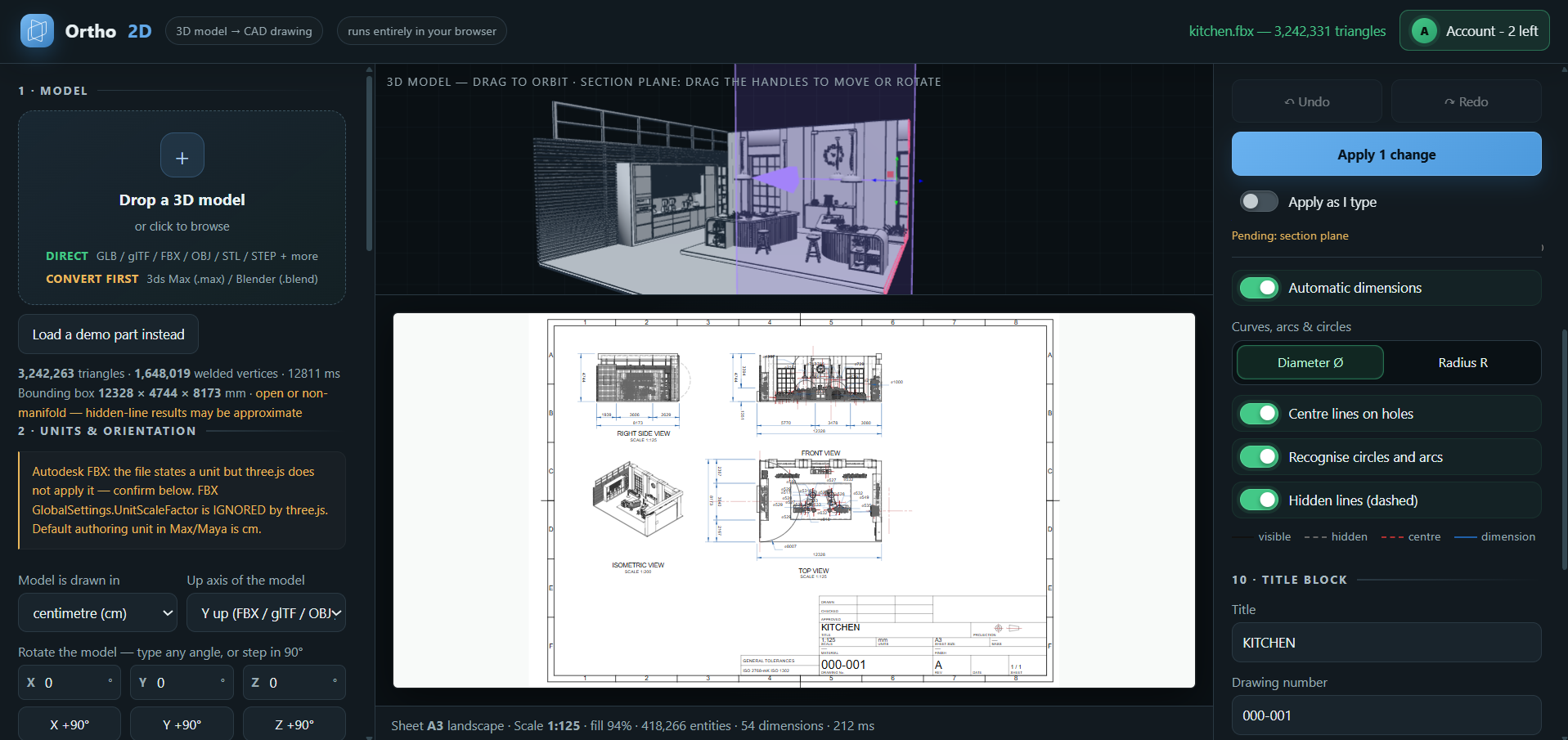
Orbit the geometry, place sections, and immediately understand how each decision affects the finished sheet.
Ortho2D is not a format swap. It reads the solid or mesh, works out which edges are actually visible, and draws a real technical sheet — views, sections, dimensions and title block — from the geometry.
Turn a printed or scanned mesh into a dimensioned drawing with clean arcs recovered from the tessellation.
Take a manufacturing exchange solid straight to orthographic views, sections and a fabrication-ready PDF or DXF.
Drop in an OBJ, confirm the units, and get a scaled drawing instead of a screenshot.
The most reliable route out of Blender, 3ds Max, SketchUp and Revit — export GLB, drop it in, draw it.
Animation and architecture pipelines export FBX; Ortho2D reads it and documents it.
Legacy exchange files open in the browser and land on an ISO or ANSI sheet.
Rhino models become plans, elevations and sections without leaving the browser.
Additive-manufacturing and scan formats get the same dimensioned treatment.
Scalable vector output for reports, presentations, laser cutting and web documentation.
Different trades ask for this under different names. A machinist wants a technical drawing from a STEP file; a fabricator asks for shop drawings or working drawings; an architect says blueprints, plans, elevations and sections; someone holding a printed part just wants the mesh turned into a DXF. It is one piece of work — orthographic views, sections and dimensions generated from the geometry instead of drafted by hand, and done without an AutoCAD seat.
A short path from geometry to documentation—without a heavyweight CAD installation.
Drop a supported mesh or CAD exchange file into the browser and confirm its units and orientation.
Choose views, sections, dimensions, standards, line weights, title details, and drawing scale.
Download a polished PDF, editable DXF, or scalable SVG ready for your next workflow.
Drawing plans cover downloads from 3D → 2D, 2D CAD and Packaging (a final packaging export counts as 100 downloads). Photo to 3D has its own plans below, or pay as you go with Ortho2D credits.
Photo to 3D uses Ortho2D credits: a Standard model (2K textures) uses 20 credits ($2), an Ultra model with 4K textures and high-poly detail uses 40 credits ($4). Choose a monthly plan (no commitment, cancel any time), or buy credits when you need them. Downloading the model you made is included — no extra download charge. Just need one? Buy a single model for $2.
| Drawing plans | Single download | Professional | Studio | Pro |
|---|---|---|---|---|
| Monthly file downloads (drawings and 3D files) | $2 each | 1,000 | 3,000 | 6,500 |
| Packaging final export (1 export = 100 downloads) | $2 each | Up to 10 / month | Up to 30 / month | Up to 65 / month |
| Photo to 3D models | Credits | Credits | Credits | Credits |
| Direct model processing in browser | ✓ | ✓ | ✓ | ✓ |
| Automatic dimensions and sections | ✓ | ✓ | ✓ | ✓ |
| PDF, DXF R2000, DXF R12, SVG | $2 per file | ✓ | ✓ | ✓ |
| Mechanical and architectural sheets | ✓ | ✓ | ✓ | ✓ |
| Support | Community | Priority | Priority |
Ortho2D performs geometry processing inside the browser, reducing upload delays and unnecessary exposure of project files.
Open Ortho2D in your browser, drop in an STL, STEP, OBJ, GLB, FBX, IGES or 3DM file, confirm the units and orientation, then choose the views, sections and dimensions you want. Ortho2D lays the engineering drawing out on a standards-based sheet and exports PDF, DXF or SVG.
Yes. Ortho2D reads STL, STEP, IGES, OBJ, GLB, glTF, FBX, 3DM, 3MF and PLY, and writes DXF R2000 and DXF R12 with real CAD layers and entities, plus PDF and SVG.
No. The current engine performs model parsing and drawing generation in your browser. Some format-reader libraries are loaded from a CDN, but your geometry is processed locally.
Native .max and .blend scene files need conversion first. Export GLB/glTF for the most reliable path, or use FBX when needed.
Not directly, and no honest browser tool can: reliable DWG writing is not available client-side. Ortho2D exports standard DXF, which AutoCAD, BricsCAD, ZWCAD and LibreCAD all open, and any of them will save it out as DWG in one step.
The engine includes ISO and ANSI sheet sizes, first- and third-angle projection, ISO 128 line-weight groups, ISO 3098 lettering, standard scale ladders, and mechanical or architectural title blocks.
Each exported PDF, DXF R2000, DXF R12, or SVG file counts as one download. Importing models, previewing views, adjusting settings, and regenerating the on-screen sheet do not consume the monthly allowance.
The allowance resets once per monthly subscription cycle. Paid plans include 1,000, 3,000 or 6,500 downloads a month according to the selected tier. There is no free download allowance — downloading a file requires a $2 single export or a subscription, though building the drawing on screen is free and unlimited.
Open the browser engine, load a model, and build your first sheet in minutes.
Launch Ortho2D ↗